

It is well known how to link to a specific time in a YouTube video.
You can do it like this: http://youtu.be/zSv5CvhOEsA?t=3m46s
The YouTube screen itself has a user interface like this, making the link easy to create.
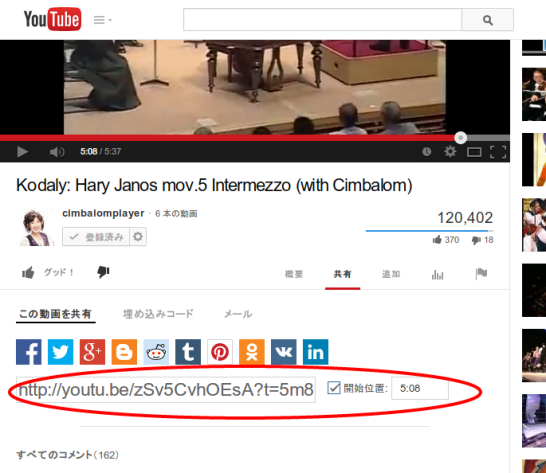
However, this interface does not appear when using the “embed code,” giving the impression that you can link only to the beginning of the video.
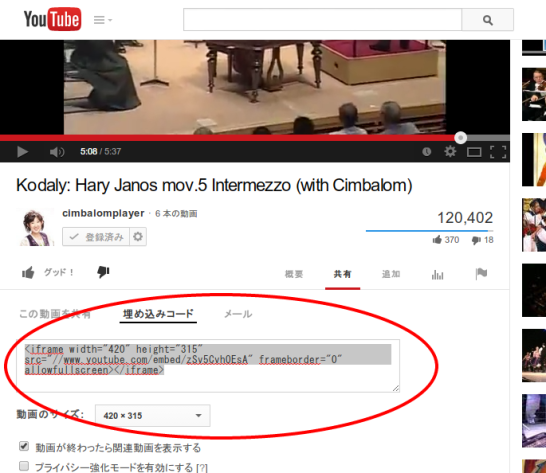
Indeed, adding a string such as “?t=5m8s” to the src= link does not work.
In fact, however, different syntax lets you link to a point partway through the video.
For the example above:
<iframe width=”420″ height=”315″
src=”//www.youtube.com/embed/zSv5CvhOEsA?start=77”
frameborder=”0″ allowfullscreen></iframe>
Add the starting point by placing after “?start=” the desired start time as an integer number of seconds.
You can similarly specify the ending point by adding a parameter such as “end=108.” It looks like this:
<iframe width=”420″ height=”315″
src=”//www.youtube.com/embed/zSv5CvhOEsA?start=77&end=108”
frameborder=”0″ allowfullscreen></iframe>
Here is what it looks like in practice.

It worked!
See you next time!
Related posts

Let’s Call Japan Post’s Digi-Ad API and Retrieve an “Address.” Is It Really OAuth?
Sorry for the long gap after I became unwell. In the previous article, I obtained a Japan Post Digital Address (Digi-Ad) and used it in Japan…

X (formerly Twitter) to Remove “Like” and “Repost” Counts from the Timeline
It appears that X (formerly Twitter) will remove the counts for “likes” and “reposts” from the timeline. As of March 8, tweets in the timeline show…

I Asked ChatGPT to Explain ID Tokens and Access Tokens in the Style of the King James Bible
People in the community have been having fun asking it to explain various things, and among them, Sarah Cecchetti, Head of Cognito at AWS, had it…
You must be logged in to post a comment.