

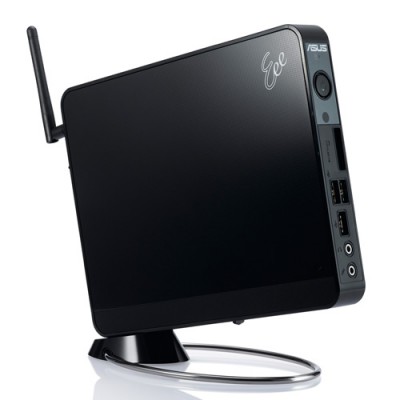
 In a corner of our server room—also known as the storage closet—sat, for nearly 4 years without being powered on, an EeeBox[1]. I had erased its recovery partition, installed Debian Lenny, and used it as a server for a while. But when power outages occurred almost daily after the Great East Japan Earthquake, I gave up, moved to the cloud, and left it untouched. I decided to revive it for my daughter.
At first I considered restoring Windows, but the included version was Windows XP. That was understandable for a machine bought on January 2009, but it would not do. I briefly considered Lubuntu versus Xubuntu, but Lubuntu seemed the only choice for this low-memory machine, so I installed Lubuntu 14.10.
The procedure follows.
Preparing the Installation SD Card
- Using a Mac OS 10.10.1 machine, obtain the Lubuntu 14.10 PC 32-bit version from the download page.
- In Terminal, go to the download folder. (For me: $ cd Download)
- Convert the downloaded .iso file to an .img file as follows.
$ hdiutil convert -format UDRW -o ./lubuntu-14.10-desktop-i386.img ./lubuntu-14.10-desktop-i386.iso
- hdiutil automatically appends .dmg to the filename, so remove it.
$ mv ./lubuntu-14.10-desktop-i386.img.dmg ./lubuntu-14.10-desktop-i386.img
- Insert the SD card that will become the boot drive.
- Run diskutil list in Terminal to find the disk path.
$ diskutil list
/dev/disk0
   #:                       TYPE NAME                    SIZE       IDENTIFIER
   0:      GUID_partition_scheme                        *500.1 GB   disk0
   1:                        EFI EFI                     209.7 MB   disk0s1
   2:                  Apple_HFS Macintosh HD            499.2 GB   disk0s2
   3:                 Apple_Boot Recovery HD             650.0 MB   disk0s3
/dev/disk1
   #:                       TYPE NAME                    SIZE       IDENTIFIER
   0:     Apple_partition_scheme                        *2.0 TB     disk1
   1:        Apple_partition_map                         32.3 KB    disk1s1
   2:                  Apple_HFS MyBook2T                2.0 TB     disk1s3
/dev/disk2
   #:                       TYPE NAME                    SIZE       IDENTIFIER
   0:      GUID_partition_scheme                        *3.0 TB     disk2
   1:                        EFI EFI                     209.7 MB   disk2s1
   2:                  Apple_HFS TimeMachine2            3.0 TB     disk2s2
/dev/disk3
   #:                       TYPE NAME                    SIZE       IDENTIFIER
   0:     FDisk_partition_scheme                        *7.7 GB     disk3
   1:                 DOS_FAT_32 NO NAME                 7.7 GB     disk3s1
- The SD card named NO NAME was /dev/disk3, so unmount it temporarily. Because unmounting uses the volume name, find it with df.
$ df -g
Filesystem    1G-blocks Used Available Capacity   iused     ifree %iused  Mounted on
/dev/disk0s2        464  425        38    92% 111670483  10216259   92%   /
devfs                 0    0         0   100%       670         0  100%   /dev
map -hosts            0    0         0   100%         0         0  100%   /net
map auto_home         0    0         0   100%         0         0  100%   /home
/dev/disk1s3       1862 1326       536    72% 347818226 140519426   71%   /Volumes/MyBook2T
/dev/disk2s2       2794 2003       790    72% 262631430 103609902   72%   /Volumes/TimeMachine2
/dev/disk3s1         15    0        15     0%         0         0  100%   /Volumes/NO NAME
- Unmount it. Otherwise the next write fails with Resource busy.
$ diskutil umount /Volumes/NO\ NAME/
Volume NO NAME on disk3s1 unmounted
- Write the disk image to the SD card with dd:
$ sudo dd if=lubuntu-14.10-desktop-i386.img of=/dev/rdisk3 bs=256m
2+1 records in
2+1 records out
739246080 bytes transferred in 148.771499 secs (4969003 bytes/sec)
- After writing finishes, macOS tries to mount it and says it cannot read it; choose Eject.
Installing on the EeePC
- Remove the created SD card and insert it into the EeePC.
- Power on and press DEL to enter setup. Configure the boot device. The SD card is recognized as a hard disk, so change the HDD boot order. Save with F10 and restart.
- Then follow the wizard. When installation finishes, restart when prompted, removing the SD card first.
Japanese Input Settings
- By default, switching Japanese input is assigned to
<super>+<space>. Perhaps it is just habit, but I wanted<control>+<space>, so I configured it under Preferences > Keyboard Input Methods in the Lubuntu menu.
This is adequate for using Google Documents in Firefox, though the text being converted appears slightly below the input line. AbiWord does not display the input string inline, so it is probably unusable.
[1] ASUS EeeBox MODEL:EBXB202 BLK/VK191T. CPU: Atom N270, Memory: 1GB, HDD: 80GB, Wireless: 802.11n. Includes Windows XP Home (JPN).
Related posts
Setting Up a NextCloud Server on DigitalOcean
When I met my friend Johannes, who has even been honored at the Davos conference, at the end of last year, he said, “You're still using…

If You’re Making a Presentation, gamma.app May Be the Way to Go
Yesterday, information saying, “If you’re making a presentation, use gamma.app,” reached me from 2 independent directions. So I started by trying the free version. To give…

Migrating WordPress Brought Up the Dreaded Installation Screen
Yes, I ran into this this morning as well. With MyISAM, you only need to move the database files, but because InnoDB was involved this time,…
You must be logged in to post a comment.