
유럽위원회 위원장이 EU 연령 확인이 가능하다고 발표
지난 4월 15일 EU의 폰데아라이엔 유럽위원회 위원장이 EU 연령 확인 앱을 사용할 수 있게 되었다고 발표했습니다.
It is for parents to raise their children. Not platforms.
The European Age Verification App is ready ↓ https://t.co/EumEPEJOI7
그런데, 그때 얼마 지나지 않아, 이하와 같은 「2분으로 해킹할 수 있다」라고 하는 리포트가 오르기 시작했습니다.
협력자 있음 공격
첫 번째는 협력자있는 본인에 의한 공격입니다. 포인트는
- 일단 연령 확인용 자격증 발급을 받으면 횟수 무제한으로 사용할 수 있습니다.
- 사용에 있어서는, PIN이나 생체 정보는 특별히 필요 없다.
- (이 자격 증명은 하드웨어에도 App Instance에도 바인딩되지 않고 다른 스마트폰에 가져갈 수도 있다는 정보도…
입니다. 그러므로 18세 이상의 협력자를 얻은 18세 미만의 공격자는 18세 이상이라는 자격 증명의 발행을 받고, 그것을 무제한으로 이용 가능하다는 것입니다. 전화를 root화하고 있는 것 등이 필요하게 됩니다만, 본인이 하기 때문에, 그것은 할 수 버립니다군요. 그래서 위협 모델링적으로는, 본인도 전화도 월렛 앱의 인스턴스도 신용할 수 없는 전제로 어떻게 할까, 라고 하는 것입니다만, 이번 릴리스된 것은, 비례성의 원칙 등으로부터, 거기에는 눈을 뜨는 형태가 되어 있는 것 같습니다.
해킹 # EU #나이인증 app in under 2 minutes.
During setup, the app asks you to create a PIN. After entry, the app *encrypts* it and saves it in the shared_prefs directory.
1. It shouldn't be encrypted at all – that's a really poor design.
2. It's not… https://t.co/z39qBdclC2 pic.twitter.com/FGRvWtWzaZ
.@vonderleyen "The European #AgeVerification app is technically ready. It respects the highest privacy standards in the world. It's open-source, so anyone can check the code…"
I did. It didn't take long to find what looks like a serious #privacy issue.
The app goes to great lengths to protect the AV data AFTER collection (is_over_18: true is AES-GCM'd); it does so pretty well.
But, the source image used to collect that data is written to disk without encryption and not deleted correctly.
For NFC biometric data:
It pulls DG2 and writes a lossless PNG to the filesystem. It's only deleted on success. If it fails for any reason (user clicks back, scan fails & retries, app crashes etc), the full biometric image remains on the device in cache. the app makes no attempt to encrypt/protect them.
For selfie pictures:
Different scenario. These images are written to external storage in lossless PNG format, but they're never deleted. Not a cache… long-term storage. These are protected with DE keys at the Android level, but again, the app makes no attempt to
This is akin to taking a picture of your passport/government ID using the camera app and keeping it just in case. You can encrypt data taken from it until you're blue in the face… leaving the original image on disk is crazy & unnecessary.
From a #GDPR standpoint:
Biometric data collected is special category data. If there's no lawful basis to retain it after processing, that's potentially a material breach.
https://youtube.com/watch?v=4VRRriyDKKk
검증자의 검증 구현 오류
또 하나 올라온 보고서는 검증자에서 연령 인증을 우회할 수 있다는 것이었습니다. 단지 이것은 어떻습니까… 사용하고 있는 「발행자(issuer)」는 샘플용의 발행자이며, 「검증자(verifier)」도 샘플용입니다. 흐름적으로는
- 시료용 발행자로 연령 확인용 mdoc/sd-jwt의 발행을 받는다.
- 이것을 사용하면 연령 확인이 필요한 샘플 사이트에 로그인 할 수 있습니다.
입니다. 아래 데모를 참조하세요.
우회 # EU #나이인증 using their own infrastructure.
I've ported the Android app logic to a Chrome extension – stripping out the pesky step of handing over biometric data which they can leak… and pass verification instantly.
1단계: 확장 프로그램 설치
Step 2:… https://t.co/9zSony8Em4 pic.twitter.com/a5oQnf0n2Y
Hacking the #EU #AgeVerification app in under 2 minutes.
During setup, the app asks you to create a PIN. After entry, the app *encrypts* it and saves it in the shared_prefs directory.
1. It shouldn't be encrypted at all – that's a really poor design.
2. It's not cryptographically tied to the vault which contains the identity data.
So, an attacker can simply remove the PinEnc/PinIV values from the shared_prefs file and restart the app.
After choosing a different PIN, the app presents credentials created under the old profile and let's the attacker present them as valid.
기타 문제 :
1. Rate limiting is an incrementing number in the same config file. Just reset it to 0 and keep trying.
2. "UseBiometricAuth" is a boolean, also in the same file. Set it to false and it just skips that step.
Seriously @vonderleyen – this product will be the catalyst for an enormous breach at some point. It's just a matter of time.
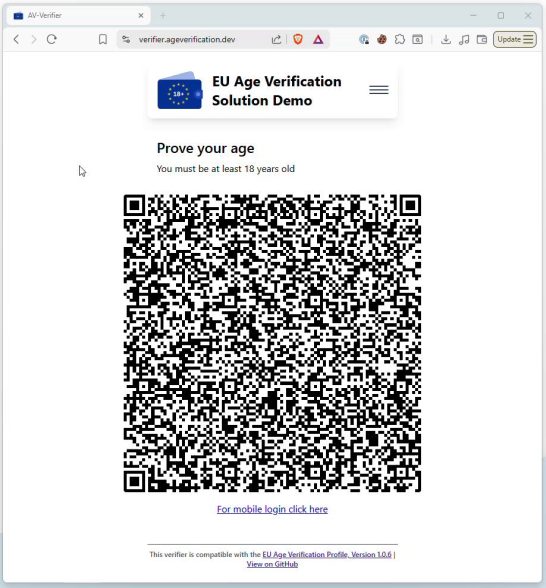
그렇지만, 이 발행자도 검증자도 성공했을 때에는 이런 식으로 움직여, 라고 하는 데모를 하고 있는 것만으로 보입니다. mdoc/sd-jwt의 발행을 받는데도 특히 신분증명서의 확인은 필요없는 것 같습니다. 검증자측도 공개되고 있는 코드를 보는 한 제대로 검증하고 있지 않습니다. 구체적으로는DocumentValidator.kt 그럼 일단 서명 검증은 하고 있어, 발행자가 트러스트 리스트에 들어가 있을지도 검증하고 있는 것 같습니다만, 그것이 실패해도 자격증에 들어가 있던 정보를 담았다 trust_info 라는 데이터 구조를 반환하고 그 안에 age_over_18 라는 claim 가 들어 있으면, 연령 확인 성공으로 버린다고 하는 식으로 되어 있는 것처럼 보입니다.
다만, 이것은 어디까지나 데모 앱 위에서이니까요. 물론 이 데모 앱의 코드를 그대로 유용해 프로덕션 사이트를 만들면 아웃입니다만, 조금 너무 시끄러운 느낌도 합니다.
단지, 주저도 실장되는 방향에 놓여져서는,
- 제대로 서명 확인
- 제대로 신뢰할 수 있는 발행자까지의 트러스트 체인의 검증도 한다
- 이 결과를 액세스 관리에 반영
잊지 않도록. 이것은 디지털 청「속성 증명의 과제 정리에 관한 유식자 회의」하지만 계속 말하고 있었던 것입니다만.
그리고, 폰데얼라이엔 위원장의 「아이를 지키는 것은 플랫폼이 아니라 부모이다」라고 하는 것을 구현하려고 하면, 부모와 자식 관계의 증명이 필요합니다만, 연령 확인만으로는 그것은 할 수 없습니다.
또 다른. 여기에서 다루어지는 연령 확인 앱은 ISO/IEC 27566 등에서 말하는 "연령 보장 프레임워크"와 다릅니다. '연령 보장 프레임워크'의 '연령 확인' 구성요소 부분에 해당합니다.
덧붙여 차피에게 4월 16일 시점의 소스 코드의 해석을 받았으므로, 이하에 부록으로 붙여 둡니다. 내용이 올바른지 여부는 확인되지 않았습니다. (처음의 분 조금 보았습니다만.) 엔지니어 각위에 놓여져서는, 이상한 곳 등 발견되면 교시해 주시면 다행입니다.
부록 A. ChatGPT에 의한 OpenID4VP 처리 부분의 소스 코드 검증
- Wallet posts the response to
/wallet/direct_post.
The repo docs identify/wallet/direct_postas the wallet-response endpoint. The backend path that processes that response isPostWalletResponseLive.invokeatPostWalletResponse.kt:223-233, 호출doInvoke(...)at235-265. - The response is submitted and each
vp_tokenitem is validated.
InPostWalletResponse.kt:318-334,submit(...)converts the wallet payload withresponseObject.toDomain(...). 내부AuthorisationResponseTO.verifiablePresentations(...), each VP element is passed tovalidateVerifiablePresentation(...).bind()atPostWalletResponse.kt:100-155특히136-145. - 럭셔리
mso_mdoc, the backend takes the MSO mdoc validator path and stores trust info.
InValidateSdJwtVcOrMsoMdocVerifiablePresentation.kt:92-101밸리Format.MsoMdocbranch callsvalidator.validateMsoMdocVerifiablePresentation(...)그리고addTrustInfo(transactionId, trustInfo)The trust-info store helpers are at54-68. - The backend does perform real chain and issuer-signature checks.
InDocumentValidator.kt:80-105,ensureValidWithTrustInfo(document)runs the document validation sequence. The issuer signature check isensureValidIssuerSignature(...)at137-146The chain-trust check isensureValidChain(...)at218-226Trust metadata is assembled inbuildTrustInfoFromResults(...)at234-263. - But trust/signature failure is downgraded to
trust_info, not enforced as rejection.
The critical code isDeviceResponseValidator.kt:95-125The comment at95-98says the method “does not fail due to trust issues.” At104-118만약documentValidator.ensureValidWithTrustInfo(document)반품Left, the code createsdefaultTrust과issuerInTrustedList=false,issuerNotExpired=false예산 및signatureValid=false, then still returnsDocumentWithTrust(document, defaultTrust). 에122-125, it returns a successfulDocumentValidationResult. - The presentation validator then accepts the VP anyway unless
issuerAuth누락되었습니다.
InValidateSdJwtVcOrMsoMdocVerifiablePresentation.kt:159-182,validateMsoMdocVerifiablePresentation(...)통화ensureValidWithTrustInfo(...)at166-171, 추출물documentstrustInfosat173-174, and then only enforces thatdocument.issuerSigned.issuerAuthis present at176-179. 그렇습니다 지원 필요signatureValid,issuerInTrustedList및isFullyTrustedto be true before returning success at182. - Because of that, the wallet response is stored and the transaction moves to Submitted state.
뒤쪽에PostWalletResponse.kt,submit(...)를 반환Submittedpresentation at318-334예산 및doInvoke(...)stores it at249-252So the verifier backend accepts and stores the wallet response even when trust/signature failed in the permissive mdoc path above. - When the verifier UI polls
/ui/presentations/{transactionId}, the backend attachestrust_infoto the response.
The repo docs identifyGET /ui/presentations/{transactionId}as the verifier's wallet-response endpoint. InGetWalletResponse.kt:119-132,found(...)gets the stored trust info withValidateSdJwtVcOrMsoMdocVerifiablePresentation.getTrustInfo(...), copies it into the returned wallet response, then clears the store. - The frontend polls that endpoint and receives
vp_tokenplus optionaltrust_info.
Inpresentation.ts:68-114,GetPresentationState(transactionID)가져오다GET /ui/presentations/${transactionID}. - The frontend sets
trust_info, but independently decodesproof_of_ageand uses its attributes as the success source.
InApp.tsx:178-191만약data.trust_infoexists it is stored, but the code then decodesdata.vp_token.proof_of_age및 세트verifiedData에firstAttestation.attributes. 그런 다음App.tsx:211-221,isAgeOver18is computed only from whetherverifiedData이 포함되어 있습니다age_over_18=true. - The success message is driven by
verifiedData, while trust is rendered separately.verification-texts.tsx:19-25shows “You have successfully proven your age” purely from theeu.europa.ec.av.1:age_over_18value. Separately,App.tsx:246-253렌더링TrustInfoDisplayonly as an additional component. Intrust-info.tsx:78-145, that component shows a scorecard; it does not gate the success message.