
European Commission President Announces That EU Age Verification Is Available
On April 15, European Commission President Ursula von der Leyen announced that the EU age-verification app was available.
It is for parents to raise their children. Not platforms.
The European Age Verification App is ready ↓ https://t.co/EumEPEJOI7
Soon afterward, however, reports like the following began appearing, claiming that it could be “hacked in 2 minutes.”
Attack with a Cooperating Party
The 1st is an attack carried out by the person concerned with a cooperating party. The key points are:
- Once an age-verification credential has been issued, it can be used an unlimited number of times.
- No PIN or biometric information is specifically required to use it.
- (There is also information suggesting that this credential is bound neither to the hardware nor to the App Instance and can be moved to another smartphone… Well, in an attack involving a cooperating party, that party could simply have the credential issued on the attacker’s smartphone, so this point itself is not particularly important.)
Thus, with the cooperation of someone aged 18 or older, an attacker under the age of 18 can have a credential stating that they are aged 18 or older issued and then use it without limit. This requires measures such as rooting the phone, but because the person concerned is doing it, that is feasible. From a threat-modeling perspective, the question is therefore what to do under the assumption that neither the person, the phone, nor the wallet-app instance can be trusted. The version released this time appears to have chosen not to address that point, for reasons including the principle of proportionality.
Hacking the #EU #AgeVerification app in under 2 minutes.
During setup, the app asks you to create a PIN. After entry, the app *encrypts* it and saves it in the shared_prefs directory.
1. It shouldn’t be encrypted at all – that’s a really poor design.
2. It’s not… https://t.co/z39qBdclC2 pic.twitter.com/FGRvWtWzaZ
.@vonderleyen "The European #AgeVerification app is technically ready. It respects the highest privacy standards in the world. It's open-source, so anyone can check the code…"
I did. It didn't take long to find what looks like a serious #privacy issue.
The app goes to great lengths to protect the AV data AFTER collection (is_over_18: true is AES-GCM'd); it does so pretty well.
But, the source image used to collect that data is written to disk without encryption and not deleted correctly.
For NFC biometric data:
It pulls DG2 and writes a lossless PNG to the filesystem. It's only deleted on success. If it fails for any reason (user clicks back, scan fails & retries, app crashes etc), the full biometric image remains on the device in cache. This is protected with CE keys at the Android level, but the app makes no attempt to encrypt/protect them.
For selfie pictures:
Different scenario. These images are written to external storage in lossless PNG format, but they're never deleted. Not a cache… long-term storage. These are protected with DE keys at the Android level, but again, the app makes no attempt to encrypt/protect them.
This is akin to taking a picture of your passport/government ID using the camera app and keeping it just in case. You can encrypt data taken from it until you're blue in the face… leaving the original image on disk is crazy & unnecessary.
From a #GDPR standpoint:
Biometric data collected is special category data. If there's no lawful basis to retain it after processing, that's potentially a material breach.
https://youtube.com/watch?v=4VRRriyDKKk
Verification Implementation Error at the Verifier
Another report claimed that age verification could be bypassed at the verifier. But I am not sure what to make of this… The “issuer” being used is a sample issuer, and the “verifier” is also a sample. The flow is:
- Obtain an age-verification mdoc/sd-jwt from the sample issuer.
- Use it to log in to a sample site that requires age verification.
Please see the demonstration below.
Bypassing #EU #AgeVerification using their own infrastructure.
I’ve ported the Android app logic to a Chrome extension – stripping out the pesky step of handing over biometric data which they can leak… and pass verification instantly.
Step 1: Install the extension
Step 2:… https://t.co/9zSony8Em4 pic.twitter.com/a5oQnf0n2Y
Hacking the #EU #AgeVerification app in under 2 minutes.
During setup, the app asks you to create a PIN. After entry, the app *encrypts* it and saves it in the shared_prefs directory.
1. It shouldn't be encrypted at all – that's a really poor design.
2. It's not cryptographically tied to the vault which contains the identity data.
So, an attacker can simply remove the PinEnc/PinIV values from the shared_prefs file and restart the app.
After choosing a different PIN, the app presents credentials created under the old profile and let's the attacker present them as valid.
Other issues:
1. Rate limiting is an incrementing number in the same config file. Just reset it to 0 and keep trying.
2. "UseBiometricAuth" is a boolean, also in the same file. Set it to false and it just skips that step.
Seriously @vonderleyen – this product will be the catalyst for an enormous breach at some point. It's just a matter of time.
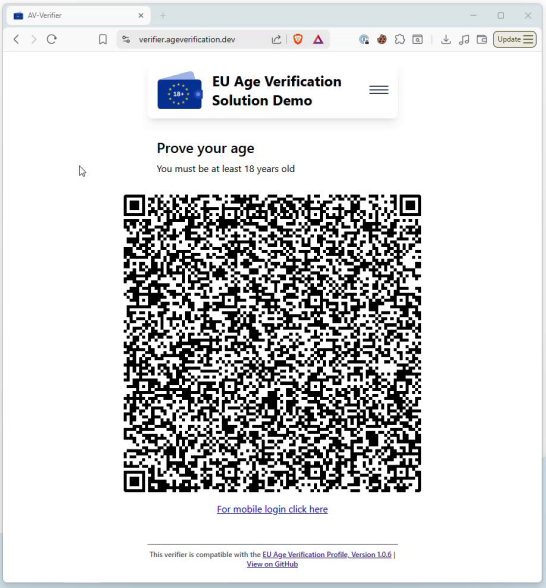
That said, both this issuer and verifier appear merely to be demonstrations of how they operate when things succeed. It also appears that no identity-document check is required to obtain an mdoc/sd-jwt. As far as the publicly available code shows, the verifier does not perform proper verification either. Specifically, DocumentValidator.kt does appear to verify the signature and whether the issuer is on the trust list. Even if those checks fail, however, it returns a data structure called trust_info populated with information from the credential; if that structure contains an age_over_18 claim, it appears to treat the age verification as successful.
Still, this is only within a demo app. Of course, it would be unacceptable to build a production site by reusing this demo application’s code unchanged, but the reaction also feels somewhat excessive.
Nevertheless, anyone implementing this should be sure to:
- Properly verify signatures.
- Properly verify the trust chain up to a trusted issuer.
- Reflect the results in access management.
Please do not forget these points. They are also what I kept saying at the Digital Agency’s “Expert Panel on Organizing Issues Concerning Attribute Attestation”.
Also, implementing President von der Leyen’s statement that “it is parents, not platforms, who protect children” would require proof of the parent-child relationship. Age verification alone cannot provide that.
One more point: the age-verification app discussed here differs from the “age assurance framework” referred to in ISO/IEC 27566 and elsewhere. It corresponds to the “age verification” component within an “age assurance framework.”
I also had ChatGPT analyze the source code as of April 16, so I have included the results below as an appendix. I have not verified whether the content is correct. (I only looked briefly at the beginning.) Engineers, I would appreciate it if you could point out anything that seems wrong.
Appendix A. ChatGPT Review of the Source Code for OpenID4VP Processing
- Wallet posts the response to
/wallet/direct_post.
The repo docs identify/wallet/direct_postas the wallet-response endpoint. The backend path that processes that response isPostWalletResponseLive.invokeatPostWalletResponse.kt:223-233, which callsdoInvoke(...)at235-265. - The response is submitted and each
vp_tokenitem is validated.
InPostWalletResponse.kt:318-334,submit(...)converts the wallet payload withresponseObject.toDomain(...). InsideAuthorisationResponseTO.verifiablePresentations(...), each VP element is passed tovalidateVerifiablePresentation(...).bind()atPostWalletResponse.kt:100-155, specifically136-145. - For
mso_mdoc, the backend takes the MSO mdoc validator path and stores trust info.
InValidateSdJwtVcOrMsoMdocVerifiablePresentation.kt:92-101, theFormat.MsoMdocbranch callsvalidator.validateMsoMdocVerifiablePresentation(...)and thenaddTrustInfo(transactionId, trustInfo). The trust-info store helpers are at54-68. - The backend does perform real chain and issuer-signature checks.
InDocumentValidator.kt:80-105,ensureValidWithTrustInfo(document)runs the document validation sequence. The issuer signature check isensureValidIssuerSignature(...)at137-146. The chain-trust check isensureValidChain(...)at218-226. Trust metadata is assembled inbuildTrustInfoFromResults(...)at234-263. - But trust/signature failure is downgraded to
trust_info, not enforced as rejection.
The critical code isDeviceResponseValidator.kt:95-125. The comment at95-98says the method “does not fail due to trust issues.” At104-118, ifdocumentValidator.ensureValidWithTrustInfo(document)returnsLeft, the code createsdefaultTrustwithissuerInTrustedList=false,issuerNotExpired=false, andsignatureValid=false, then still returnsDocumentWithTrust(document, defaultTrust). At122-125, it returns a successfulDocumentValidationResult. - The presentation validator then accepts the VP anyway unless
issuerAuthis missing.
InValidateSdJwtVcOrMsoMdocVerifiablePresentation.kt:159-182,validateMsoMdocVerifiablePresentation(...)callsensureValidWithTrustInfo(...)at166-171, extractsdocumentsandtrustInfosat173-174, and then only enforces thatdocument.issuerSigned.issuerAuthis present at176-179. It does not requiresignatureValid,issuerInTrustedList, orisFullyTrustedto be true before returning success at182. - Because of that, the wallet response is stored and the transaction moves to Submitted state.
Back inPostWalletResponse.kt,submit(...)returns aSubmittedpresentation at318-334, anddoInvoke(...)stores it at249-252. So the verifier backend accepts and stores the wallet response even when trust/signature failed in the permissive mdoc path above. - When the verifier UI polls
/ui/presentations/{transactionId}, the backend attachestrust_infoto the response.
The repo docs identifyGET /ui/presentations/{transactionId}as the verifier’s wallet-response endpoint. InGetWalletResponse.kt:119-132,found(...)gets the stored trust info withValidateSdJwtVcOrMsoMdocVerifiablePresentation.getTrustInfo(...), copies it into the returned wallet response, then clears the store. - The frontend polls that endpoint and receives
vp_tokenplus optionaltrust_info.
Inpresentation.ts:68-114,GetPresentationState(transactionID)fetchesGET /ui/presentations/${transactionID}. - The frontend sets
trust_info, but independently decodesproof_of_ageand uses its attributes as the success source.
InApp.tsx:178-191, ifdata.trust_infoexists it is stored, but the code then decodesdata.vp_token.proof_of_ageand setsverifiedDatafromfirstAttestation.attributes. Then atApp.tsx:211-221,isAgeOver18is computed only from whetherverifiedDatacontainsage_over_18=true. - The success message is driven by
verifiedData, while trust is rendered separately.verification-texts.tsx:19-25shows “You have successfully proven your age” purely from theeu.europa.ec.av.1:age_over_18value. Separately,App.tsx:246-253rendersTrustInfoDisplayonly as an additional component. Intrust-info.tsx:78-145, that component shows a scorecard; it does not gate the success message.
Related posts

Digital Agency: Expert Meeting on Organizing Issues Concerning Attribute Credentials (1st Meeting)
This is slightly old news, but on October 23 I participated remotely as a member in the Digital Agency's “Expert Meeting on Organizing Issues Concerning Attribute…
Surveillance or Efficiency? The UK’s Major Shift to a “Mandatory Digital ID Wallet”—More Than 1.6 million Sign a Parliamentary Petition in a Single Night
I posted breaking news on X, but on September 26 the UK government announced a plan to introduce digital ID through the "GOV.UK digital wallet." It…

IETF 123: OAuth WG Session 1 Summary (Japan Time, Day 24)
Overview On July 24 Japan time, OAuth WG Session 123 at IETF 1 Madrid was held. The previously announced agenda was as follows, but a session…